Install Arduino IDE + ESP32 support
https://www.arduino.cc/en/software
While installing, allow (Install) all the support packages (USB, ...)
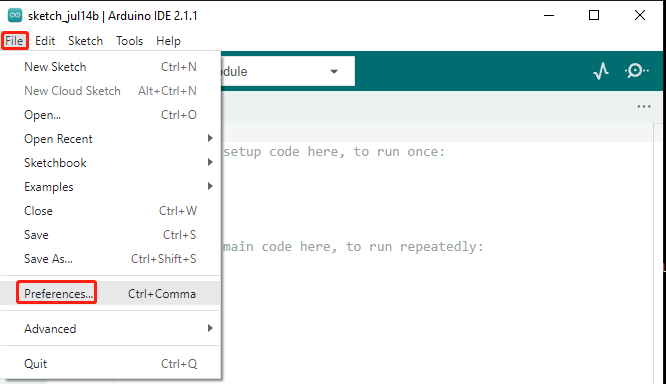
Go to File and select Preferences from the drop-down menu.
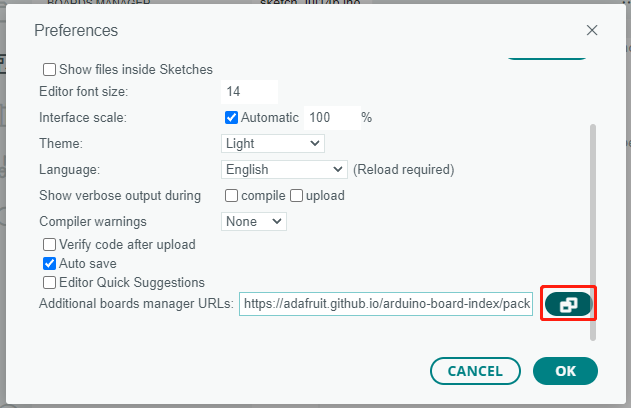
In the Preferences window, locate the Additional Board Manager URLs field. Click on it to activate the text box.
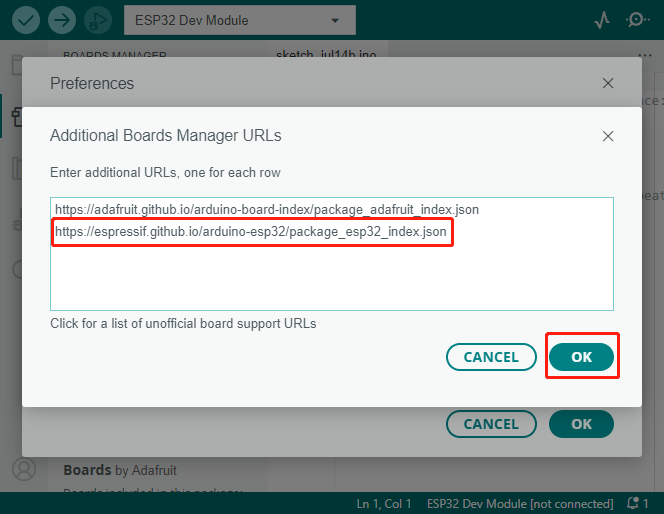
Add the following URL to the Additional Board Manager URLs field: https://espressif.github.io/arduino-esp32/package_esp32_index.json
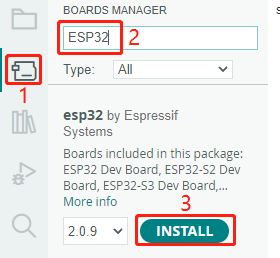
In the Boards Manager window, type ESP32 in the search bar. Click the Install button to start the installation process. This will download and install the ESP32 board package.
In case no ports are displayed after running the Arduino IDE and selecting the board, you would need to install the following drivers:
This is the link for the USB tranceiver drivers "CP210x VCP Windows":
https://www.silabs.com/developers/usb-to-uart-bridge-vcp-drivers?tab=downloads
When compiling the code, you would also need to keep the reset button pressed until the code starts to load.